
Before you start
Computer tools, KeySigner on iPhone and an Ethereum test network
- Use a known ERC-20 test contract, a test recipient and a test account with both the token and test ETH for fees. Check the contract address on the selected network.
Data and access
Prepare a test account and token
Pair the KeySigner computer tools with your phone. Choose a disposable test network, a standard ERC-20 test contract and a second test address. Fund the signing account with the test token and enough test ETH to pay the network fee.
Check. On the selected test network, confirm the sender has the test token and enough native currency for the fee.
Request the transfer
Run keysigner-eth send-token --rpc RPC_URL --token TOKEN_ADDRESS --to RECIPIENT_ADDRESS --amount 1.5. Replace the placeholders with your test network endpoint, token contract and recipient.
Check. The terminal shows 1,500,000 base units for a token with six decimal places, plus your test recipient address.
Review the approval
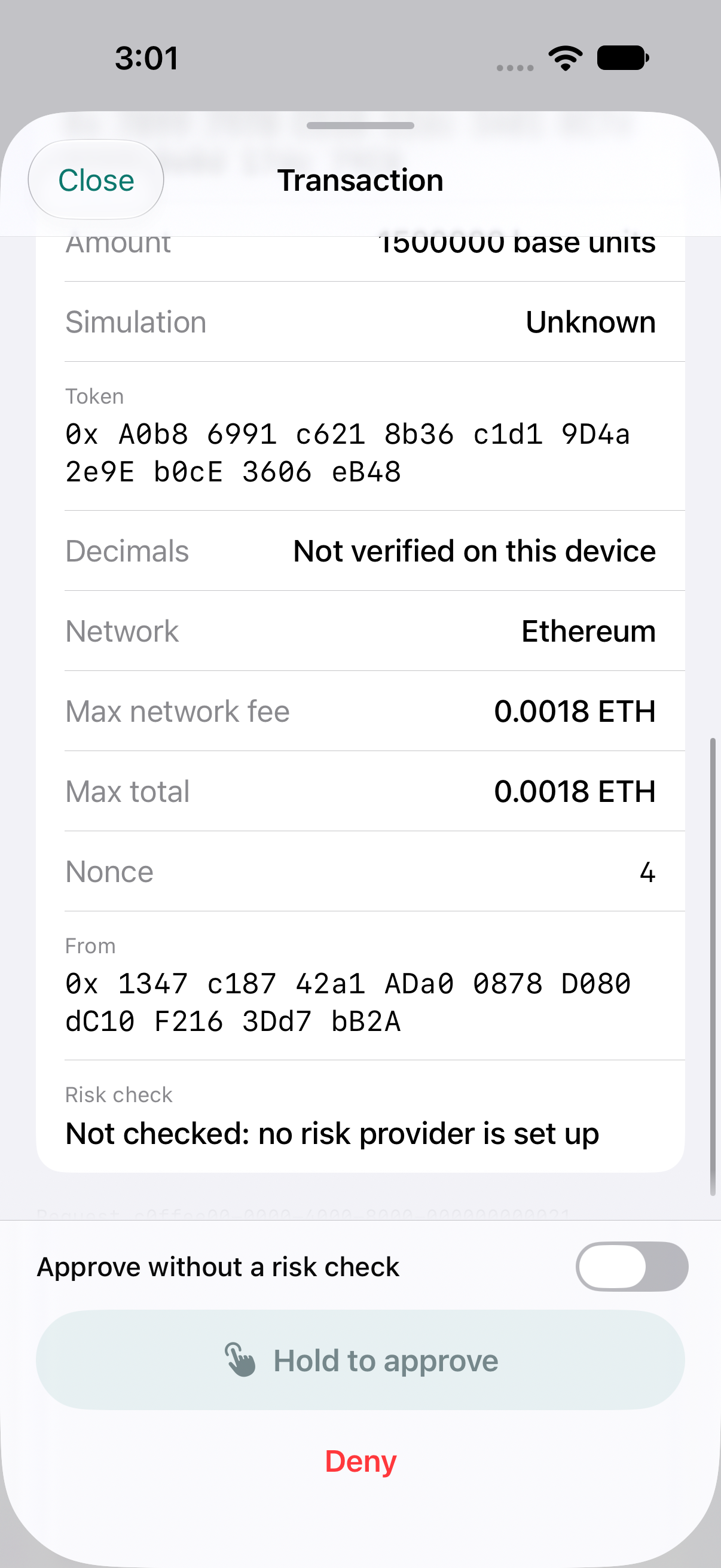
In KeySigner, open the request details to review the network, token contract and maximum fee before approving.
Check. Match the approval’s recipient, token and amount to the terminal. If you test a denial first, check that the recipient’s token balance stays unchanged.
Check the result on the network
Use the returned transaction hash to open the receipt on your test network. Read the recipient’s balance from the same token contract.
Check. Read the success status in the network receipt. The recipient’s balance for that token should increase by 1,500,000 base units.
Check your result
For a token with six decimal places, 1.5 tokens is 1,500,000 base units. The recipient's balance should increase by that amount for the standard test token in this guide.
What we tested
Tested on . The paired CLI used a local Ethereum test chain and simulated approvals. Denial left the recipient balance unchanged. Approval transferred exactly 1,500,000 base units. A separate iPhone simulator test showed the recipient and amount in the review.
If you get stuck
The command rejects the amount or token address
Confirm the address is the token contract on the selected network. Use an amount with no more decimal places than the contract reports. Check that the signing account has test ETH for the fee and enough test tokens for the transfer.