

Before you start
- Load the KeySigner development extension in a separate Chrome profile with other wallets disabled. Select Ethereum in KeySigner. You can leave the phone unpaired for these checks.
Data and access
Check that the browser sees KeySigner
Follow steps 1 and 2 of the local wallet example through the KeySigner found message. Stop before Share a test account. This checks that the extension is visible to a site that listens for wallet announcements.
Check. The local example finds KeySigner and shows no shared address.
Open Lido’s wallet picker
Open the Lido staking widget and choose Connect wallet. The Browser option is disabled while Lido’s terms checkbox is clear. Review Lido’s wallet requirements if you decide to continue.
Check. The picker shows Browser under Choose wallet. A disabled option tells you the picker has stopped at the terms step.
Open the Compound III Ethereum USDC market
Choose Connect Wallet. If the picker says No browser wallet detected even though the local check sees KeySigner, record the two results. Choose a documented wallet option for that market if you need to use Compound.
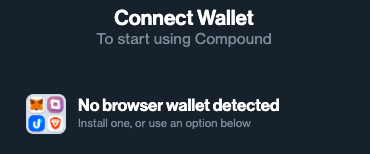
Compound’s picker in a test profile with only the KeySigner development extension enabled. View full-size screenshot Check. The message describes Compound’s wallet picker in this browser profile. In our check, the browser could see the KeySigner extension on the same page.
Check your result
Wallet discovery, address sharing, and request approval each require a separate check. This walkthrough stops at wallet discovery.
What we tested
Tested on . Tested the live Lido staking widget and Compound III Ethereum USDC market in Chromium with the KeySigner development extension only. KeySigner announced itself on both sites and both had zero shared addresses. Lido’s terms remained unchecked. Compound displayed No browser wallet detected.
If you get stuck
The local example cannot find KeySigner
Check that the development extension is enabled in this Chrome profile, then reload the local page. When you report a picker issue, include the site URL, browser and extension versions, and the message you saw.