


Before you start
KeySigner on iPhone with a test Ethereum account. Desktop Chrome 111 or later and the KeySigner development extension. Desktop Firefox 128 or later and the KeySigner development extension
- Pair the KeySigner computer tools with the phone and use a disposable Ethereum account with no funds. Install Python 3 to serve the local file and Foundry to verify the signature with cast.
- Use the development extension in a separate Chrome profile. Open the example at the local address in the guide.
- Load the temporary development add-on in a separate Firefox profile. Open the example at the local address in the guide.
- Check the Google Chrome version
- Check the Firefox version
Data and access
Run the example on your computer
Download the HTML file to an empty folder and save it as index.html. In that folder, run python3 -m http.server --bind 127.0.0.1 8000 and open http://127.0.0.1:8000/ in the test profile.
Check. The local page says KeySigner found. A fresh profile shows no shared address.
Find KeySigner and share one address
The example listens for EIP-6963 wallet announcements before asking wallets to identify themselves. It uses KeySigner’s dev.sig.wallet identifier to find the provider. Choose Share a test account, verify the site shown in the KeySigner prompt and select only your disposable account.
Check. The page shows only the address you selected. The identifier in an announcement is supplied by the provider. Verify the account and signature independently.
Approve and verify the fixed message
Choose Request a signature. On your phone, match the local site, test address and exact message shown on the page. Approve the request, then replace ADDRESS and SIGNATURE in the command with the values the page displays.
cast wallet verify --address ADDRESS \
  "KeySigner local demo. No login, payment, or permission." SIGNATURE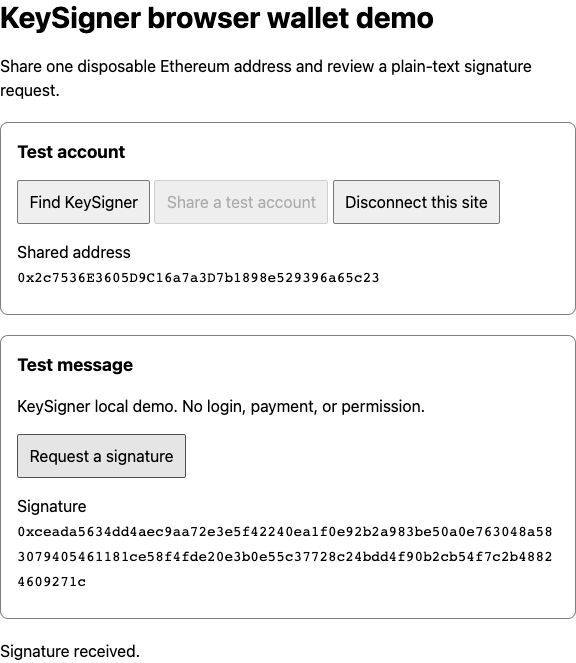
A local site received a signature from KeySigner. The address belongs to a disposable test account. View full-size screenshot Check. The command verifies that the displayed address signed that exact text. The example sends no transaction.
Disconnect and check the result
Choose Disconnect this site. The example calls wallet_revokePermissions, then calls eth_accounts again to check that sharing ended. Reload the page and try connecting again. Decline the prompt to check that the site receives no address.
Check. The page shows no shared address or signature. Signing stays disabled until you share one address again.
Check your result
In your own app, verify each signature against the expected message and address. Handle a declined request, and clear the address when the user disconnects. The demo message is fixed and reusable. Keep it out of authentication flows.
What we tested
Tested on . Chromium and Firefox used the development extension, the local bridge and a simulated phone. The demo verified the exact message signature and returned no accounts after disconnecting. A follow-up signing request was denied.
If you get stuck
KeySigner is unavailable or a request is declined
Check that the extension is enabled in the browser profile and reload the example. If the phone is unreachable, open the KeySigner toolbar and check the connection. When you decline a request, the example leaves the address or signature blank.