
Before you start
KeySigner on iPhone or Mac and a browser
- Use one Access Identity test user authorized to open PeopleHR. Confirm that its policy offers an authenticator app and that you have an independent place for the backup codes.
Data and access
Start two-factor setup for the test user
Ask your administrator to confirm the test user signs in through Access Identity and can choose an authenticator app. In the test user’s Access Identity account, open Two Factor Authentication. Start setup, choose the authenticator app option and select Add authenticator.
Check. Access Identity shows the authenticator enrollment for the authorized PeopleHR test user.
Enter a KeySigner code
Open Accounts and choose Add (+), then Sign-in codes and backup. Unlock Sign-in codes, choose Add account and scan the provider’s QR code. Keep that image and any setup key private. Choose Show code and complete the required approvals. Enter the current code when Access Identity asks you to verify the app.
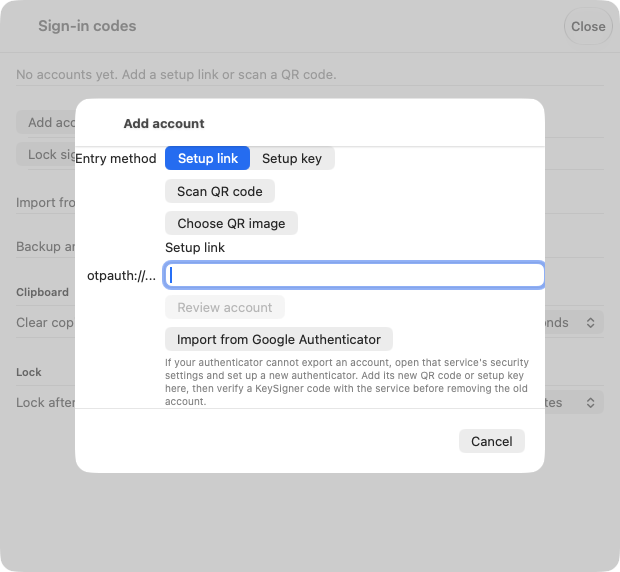
Use the authenticator setup code from Access Identity for the PeopleHR test user. View full-size screenshot Check. KeySigner lists the intended test account and Access Identity accepts the setup code.
Save the backup codes before enabling the method
Store the backup codes from Access Identity somewhere the test user can reach without the KeySigner device. Confirm the backup codes are saved and choose Enable Two Factor. Keep the original browser session open.
Check. The test user can reach the stored backup codes independently.
Open PeopleHR in a new session
In a private browser window, open the normal PeopleHR web link. Sign in as the same test user and use a fresh KeySigner code at the Access Identity authenticator prompt. Confirm PeopleHR opens under the intended user.
Check. The test user opens PeopleHR after the new authenticator challenge.
Check your result
Record the sign-in route, expected test role and who can help restore access. Verify employee records and payroll permissions separately with fictional records in the approved test environment.
What we tested
Tested on . In the local KeySigner vault test, an independent verifier accepted a fresh code from a synthetic setup link and rejected a stale code. Access documents authenticator app enrollment and separate backup codes. Verify the hosted sign-in in an authorized Access PeopleHR test account.
If you get stuck
The authentication option is missing or the code is rejected
Ask your administrator to confirm who handles the test user’s login. If another provider supplies the challenge, follow that provider’s setup. If Access Identity rejects the code, check that KeySigner shows the intended account and the device uses automatic time before trying the next code.