
Before you start
Desktop Chrome 111 or later and the KeySigner development extension
- Use a separate Chrome profile with other wallet extensions disabled. OpenSea excludes wallets that require multiple private keys to sign and send a transaction.
Data and access
Load KeySigner in a test profile
Load the KeySigner development extension in a separate Chrome profile with other wallets disabled. Open KeySigner from the toolbar and select Ethereum. You can check detection with the phone unpaired.
Check. The KeySigner icon is available in the Chrome toolbar.
Open the OpenSea wallet picker
Open opensea.io and choose Sign in. Under external wallets in the Connect with OpenSea dialog, look for KeySigner marked Installed. Close the dialog after checking.
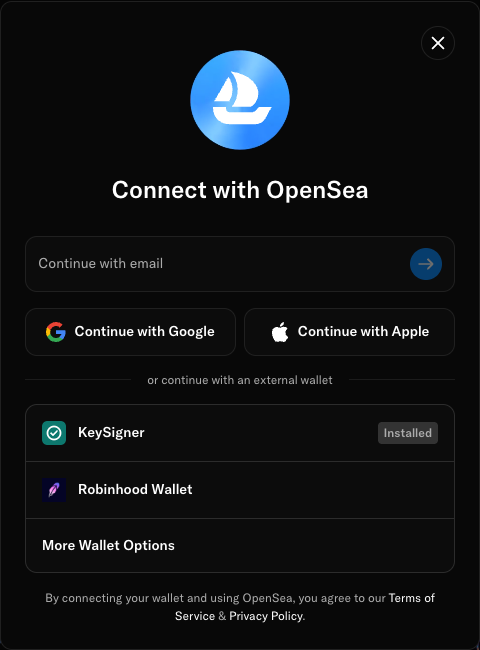
KeySigner appears in OpenSea’s external wallet list before you share an address. View full-size screenshot Check. OpenSea shows KeySigner with the Installed label.
Review OpenSea’s wallet requirements
OpenSea supports browser wallet discovery and excludes multisig wallets that require multiple private keys to sign and send a transaction. Check OpenSea’s requirements for your wallet type before choosing a wallet.
Check. OpenSea’s help article lists supported wallet types and explains its multisig restriction.
Check your result
The Installed label confirms that OpenSea detected the browser extension. Connecting an address and using it to sign are separate steps with their own requirements.
What we tested
Tested on . In Chromium 159.0.8154.6 with the KeySigner development extension, the live OpenSea dialog showed KeySigner marked Installed. We stopped with the dialog open. The browser reported zero shared addresses before and after opening it.
If you get stuck
KeySigner is missing from the OpenSea picker
Confirm that the development extension is enabled in this Chrome profile. Reload opensea.io and reopen the wallet picker. Check the extension against the local wallet example if it still does not appear.