
Before you start
Desktop Chrome, the KeySigner development extension and computer tools
- Use a fresh browser profile, Python 3 for the local test page, and a connection to Alchemy’s public World Chain Sepolia endpoint. No Alchemy API key, wallet account or test ETH is required.
Data and access
Set up the KeySigner extension
Install the KeySigner computer tools and run the command below. In a fresh Chrome profile, open chrome://extensions, turn on Developer mode, choose Load unpacked, and select apps/browser-extension/extension from your KeySigner source checkout.
keysigner-agent install-browserCheck. The Chrome extension manager lists KeySigner in the test profile.
Open the network test page
Download alchemy-network-test.html into an empty folder. In a terminal in that folder, run python3 -m http.server 8000 --bind 127.0.0.1. Open http://127.0.0.1:8000/alchemy-network-test.html in your test profile.
Download alchemy-network-test.html
Check. The local page displays “KeySigner found.”
Review and add World Chain Sepolia
Choose Add test network. In the KeySigner prompt, check that the source is 127.0.0.1:8000, the chain is World Chain Sepolia, the ID is 4801, and the RPC endpoint matches the public HTTPS address listed on Alchemy’s page. Choose Decline first. Repeat the request and choose Add network.
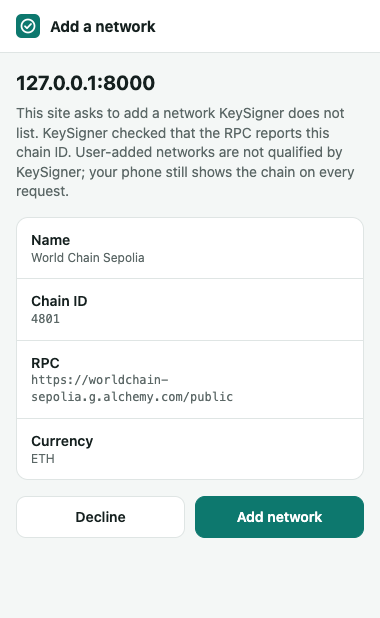
The Chrome development extension checks the RPC endpoint’s reported chain ID before asking whether to add the network. View full-size screenshot Check. Decline keeps the original chain active. Adding the network changes the active chain to 0x12c1 (4801).
Read a block and switch back
Choose Read latest block and check the chain and account count. Then choose Return to original network. Close the test profile and stop the local server when finished. The test network stays saved in that profile.
Check. The page shows a block number on chain 0x12c1 and “Accounts shared: 0.” Returning to the original network shows its chain ID (0x1 in a fresh profile).
Check your result
KeySigner reads a live World Chain Sepolia block through Alchemy and the test page reports zero accounts shared. You can then return to the original chain.
What we tested
Tested on . A fresh Chromium profile with the KeySigner development extension and computer tools used Alchemy’s public World Chain Sepolia endpoint. KeySigner honored a decline, rejected a mismatched chain ID, added chain 4801, read a live block with zero accounts shared, and switched back to the original chain.
If you get stuck
The page cannot add the network or read a block
If the page is still looking for KeySigner, check that the extension is enabled in the test profile. If the review cannot start, check that the computer tools have registered the browser bridge and that Alchemy’s public endpoint is reachable. Use a fresh profile to review the endpoint again. KeySigner can use the saved endpoint when the network already exists. Run the test from the local page to keep account access out of the check.