
Before you start
KeySigner computer tools, Anvil and Python 3
- Use Chrome 111 or later and load the unpacked development extension in a separate browser profile.
- Use Firefox 128 or later and load the temporary development add-on in a separate browser profile.
- Check the Google Chrome version
- Check the Firefox version
Data and access
Watch the network review
See the Chromium development extension review a request from the local test page, add the Anvil network and switch back.
Video transcript
- The local test page finds KeySigner. Choose Add local network.
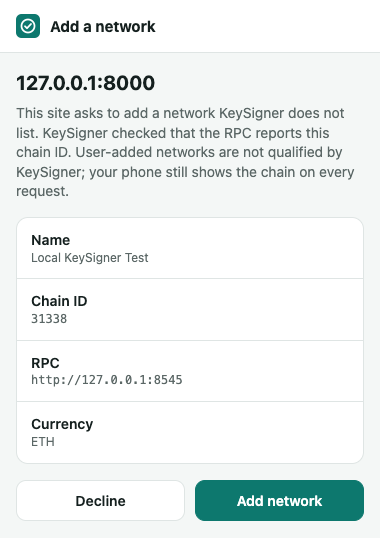
- Check the site, chain ID 31338 and RPC address. Choose Add network.
- The test page reports Active chain: 0x7a6a.
- Switch back to the original chain. The page reports 0x1.
Start a local test network
Run Anvil on your computer with chain ID 31338. Leave it running while you test. Load the KeySigner development extension in a fresh browser profile using the matching instructions below.
anvil --host 127.0.0.1 --port 8545 --chain-id 31338 --silentLoad the extension for your browser
 Chrome setup
- Choose Load unpacked in the extension manager and select the extension folder.
 Firefox setup
- Choose Load Temporary Add-on in about:debugging and select manifest.json. Load the add-on again after restarting Firefox.
Check. Anvil reports chain ID 31338 and the browser’s extension view lists KeySigner.
Open a local test page
Download network-test.html or save the source below with that filename in an empty folder. Open a second terminal in that folder and run python3 -m http.server 8000 --bind 127.0.0.1. In your test browser, open http://127.0.0.1:8000/network-test.html.
<!doctype html> <meta charset="utf-8"> <title>KeySigner local network test</title> <button id="add">Add local network</button> <button id="mismatch">Try the wrong chain ID</button> <button id="switch">Switch between saved networks</button> <p><output id="result">Looking for KeySigner…</output></p> <script> const result = document.querySelector("#result"); const rpc = "http://127.0.0.1:8545"; const ownChain = "0x7a6a"; let wallet, originalChain; const request = (method, ...params) => wallet.request({ method, params }); const current = () => request("eth_chainId"); window.addEventListener("eip6963:announceProvider", ({ detail }) => { if (detail.info.rdns !== "dev.sig.wallet" || wallet) return; wallet = detail.provider; result.textContent = "KeySigner found."; }); window.dispatchEvent(new Event("eip6963:requestProvider")); function add(chainId) { return request("wallet_addEthereumChain", { chainId, chainName: "Local KeySigner Test", rpcUrls: [rpc], nativeCurrency: { name: "Ether", symbol: "ETH", decimals: 18 } }); } function button(id, action) { document.querySelector(id).onclick = async () => { if (!wallet) return; try { await action(); result.textContent = "Active chain: " + await current(); } catch (error) { result.textContent = error.message + " Active chain: " + await current(); } }; } button("#add", async () => { originalChain ??= await current(); await add(ownChain); }); button("#mismatch", () => add("0x7a6b")); button("#switch", async () => { if (!originalChain) throw new Error("Add the local network first."); const chainId = await current() === ownChain ? originalChain : ownChain; await request("wallet_switchEthereumChain", { chainId }); }); </script>Check. The local page displays “KeySigner found.”
Review the network before adding it
Choose Add local network. In the KeySigner browser prompt, check the requesting site (127.0.0.1:8000), Local KeySigner Test, chain ID 31338 and RPC address http://127.0.0.1:8545. Try Decline first. Repeat the request and choose Add network.
Check. Decline leaves the active chain unchanged. Add network changes the active chain to 31338, displayed as 0x7a6a.
Test a mismatch and switch back
Choose Try the wrong chain ID to request 31339 from the same RPC endpoint. Then choose Switch between saved networks to return to the original chain. Choose it again to switch back to the local chain. Close the test browser and stop both local servers when finished.
Check. The mismatch says the RPC reports 31338 and leaves the active chain unchanged. The switch button returns to the original chain, then back to 0x7a6a.
Check your result
After you add the local network, the page reports Active chain: 0x7a6a (31338). The mismatched request displays an error and leaves 0x7a6a active. Switching between the saved networks changes the active chain without opening an add-network prompt.
What we tested
Tested on . Chromium and Firefox used the development extension, the local bridge and a local Anvil chain. Both declined a request, rejected a mismatched chain ID, added the matching chain and switched between saved networks.
If you get stuck
The test page can't add the network
Check that the development extension and computer tools are installed and that Anvil is listening on 127.0.0.1:8545 with chain ID 31338. If the test network was previously saved, start with a fresh profile to see the add-network prompt again. KeySigner requires HTTPS for remote RPC endpoints and allows HTTP on localhost or 127.0.0.1.