
Before you start
Desktop Chrome 111 or later, the KeySigner development extension and a paired iPhone
- Use a separate browser profile and an unfunded Ethereum test address. Select Ethereum before opening the wallet picker.
Data and access
Open the Curve wallet picker
In an isolated Chrome profile with the KeySigner extension and an unfunded test address, select Ethereum in KeySigner. Open Curve Swap and confirm the site is www.curve.finance. Choose Connect Wallet in the header, then choose KeySigner.
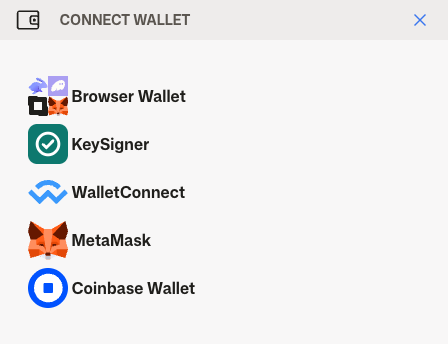
Choose KeySigner from the Curve wallet picker. View full-size screenshot Check. The Curve wallet picker displays KeySigner by name.
Share the test address
Check that the KeySigner prompt names www.curve.finance. Select only the test address and choose Share. You can stop before entering any amounts or approving any spending.
Check. KeySigner asks to share an address with www.curve.finance.
Match the account in the header
Curve replaces Connect Wallet with a shortened address. Compare the characters before and after the dots with the beginning and end of your test address.
Check. The shortened address matches the one you shared.
Remove Curve’s access
Open KeySigner in the browser toolbar. Under Connected sites, choose Disconnect for www.curve.finance. Reload Curve and check that Connect Wallet returns. Use a separate on-chain check for any token spending permissions already granted.
Check. Curve disappears from Connected sites and the app shows Connect Wallet again.
Check your result
Curve showed the selected address. Removing the site cleared its address access in the browser profile. Token approvals are separate on-chain permissions.
What we tested
Tested on . Tested live Curve Swap on Ethereum in Chromium with the KeySigner development extension, a local bridge and a simulated phone. The test shared one disposable address, verified which address appeared in the header and confirmed that removing Curve cleared the grant.
If you get stuck
KeySigner is missing from the Curve wallet picker
Check that the extension is active in this browser profile and reload Curve. If the site still shows Connect Wallet after you share, confirm Ethereum is selected and the computer tools can reach your phone.