Before you start
KeySigner on iPhone or Mac and the current Fourth Engage web login
- Use an authorized test user with the authenticator app method, one test location, and a Fourth360 administrator who can reset access.
- Check Fourth availability
Data and access
Check the test user’s sign-in method
Use the current Fourth Engage web address and a test user with access to one test location. Ask a Fourth360 administrator to confirm the user’s effective method is Require MFA – Authenticator App. Sign in until Fourth shows the authenticator QR code.
Check. Fourth shows the QR code for the intended user.
Add the Fourth account in KeySigner
Open Accounts → Add (+) → Sign-in codes and backup. Unlock Sign-in codes, choose Add account, and scan the setup QR code. Save the entry with the intended Fourth account label. Keep the QR code and setup key private.
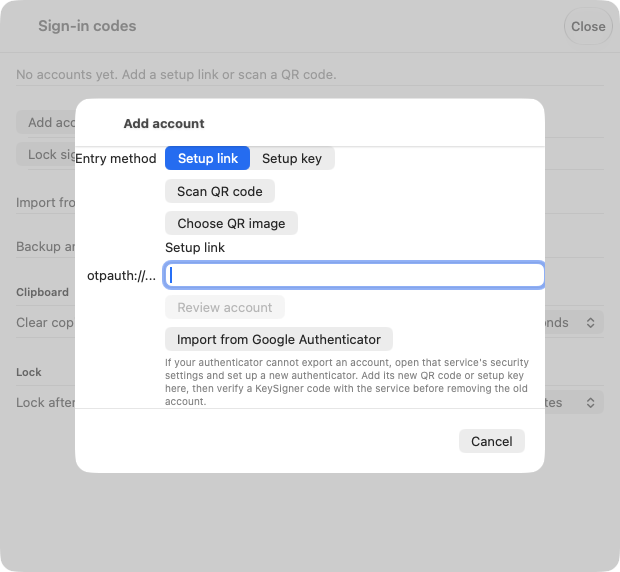
Scan the authenticator setup QR code in KeySigner. View full-size screenshot Check. KeySigner lists the correct Fourth test account.
Verify the setup code in Fourth Engage
Choose Show code in KeySigner and complete the required approvals. In Fourth, select Continue, enter the six digits before the timer ends, and select Verify. Request a fresh code from KeySigner if the timer runs out.
Check. Fourth verifies the code and completes enrollment.
Open the same location in a fresh session
Sign in as the same test user in a private browser window. Enter a fresh KeySigner code at the authenticator prompt. Check that the user can open the expected test location and view.
Check. The new session opens the expected Fourth Engage location.
Check your result
Record the Fourth account, the location it opened, and the administrator who can reset access. Check roles and location assignments separately in Fourth.
What we tested
Tested on . A local KeySigner vault test imported a synthetic setup link. An independent verifier accepted a fresh code and rejected a stale code. The Fourth Engage steps follow its published instructions. Confirm the hosted sign-in with an authorized test account.
If you get stuck
Fourth asks for an email code or you need to replace the authenticator
An email prompt uses the code sent to the Fourth account address. Ask your administrator to check the effective method if you expect an authenticator prompt. If you can still open the Fourth app, its profile offers Reset Multi-factor Authentication and signs you out. Otherwise, ask a Fourth360 administrator to reset the test user’s sign-in credentials and then repeat setup and the fresh-session check.