
Before you start
Desktop Chrome 111 or later, the KeySigner development extension and a paired iPhone
- Load the development extension in a separate browser profile. Use an unfunded Ethereum test account and leave other wallet extensions disabled in that profile.
Data and access
Open Aave in a separate browser profile
Make Ethereum the active network in KeySigner. Open app.aave.com, choose Connect Wallet and select KeySigner. Use an unfunded Ethereum test account and leave other wallet extensions disabled in this profile.
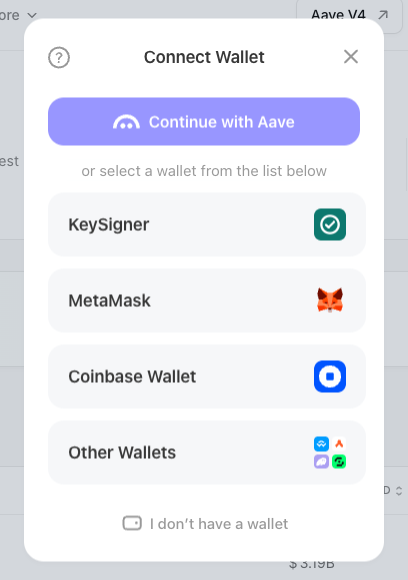
Choose KeySigner from Aave’s wallet picker. View full-size screenshot Check. Aave shows KeySigner in its wallet picker.
Share one address
In the KeySigner connection prompt, check that the site is app.aave.com. Select only the Ethereum test account, compare its address with the account you prepared and choose Share. The site can now see the address you selected, which can be used to look up public balances and positions.
Check. KeySigner asks to share an address with app.aave.com.
Check the account on the Aave dashboard
Compare the shortened address at the top of Aave with the beginning and end of the test address. Confirm that the dashboard opens for that account. Stop at the dashboard for this rehearsal.
Check. Aave shows the account you shared.
Remove the site and check Aave again
Open KeySigner from the browser toolbar and find app.aave.com under Connected sites. Choose Disconnect for that site, then reload Aave. Look for Connect Wallet in place of the account address. Check any on-chain token permissions separately.
Check. The site disappears from Connected sites and Aave shows Connect Wallet again.
Check your result
One address was visible to Aave after sharing. Removing the site cleared its access in that browser profile. Existing positions and token spending permissions remain on-chain.
What we tested
Tested on . Tested the live Aave web app in Chromium with the KeySigner development extension, a local bridge and a simulated phone. The test shared one address, checked the dashboard and verified that revocation cleared the account grant.
If you get stuck
Aave keeps showing Connect Wallet
Check that KeySigner is enabled in this browser profile and that the computer tools can reach your phone. Reload Aave and look for the KeySigner name in its wallet picker. If an account prompt opens, confirm the site and select the test address before choosing Share.